When I open Battle.net in 2026, I do not see a simple downloader anymore. I see the accumulated result of a long evolution: a launcher that has spent roughly three decades connecting Blizzard players, hosting purchases, and keeping friends within reach. The 2021 overhaul was a turning point in that story, and even now its fingerprints are visible in how I expect a modern game client to behave. At the time, Battle.net was approaching twenty-five years of service; today it is closer to thirty, and the lessons from that update still matter to me as a player of Overwatch, World of Warcraft, and Call of Duty.
The update was not merely cosmetic. Blizzard described many of the changes as front-end upgrades, but I read them as a statement about who gets to use the launcher comfortably. The new version added keyboard navigation for most of the app, increased screen reader support, and improved color contrast. In 2026, those features feel like baseline expectations, not luxury extras. Back then, they were part of a broader industry push toward accessibility, and Battle.net’s changes belonged to that moment. For me, accessibility is not decorative trim on a ship; it is the ballast that keeps more passengers aboard.
What Changed, and Why I Noticed
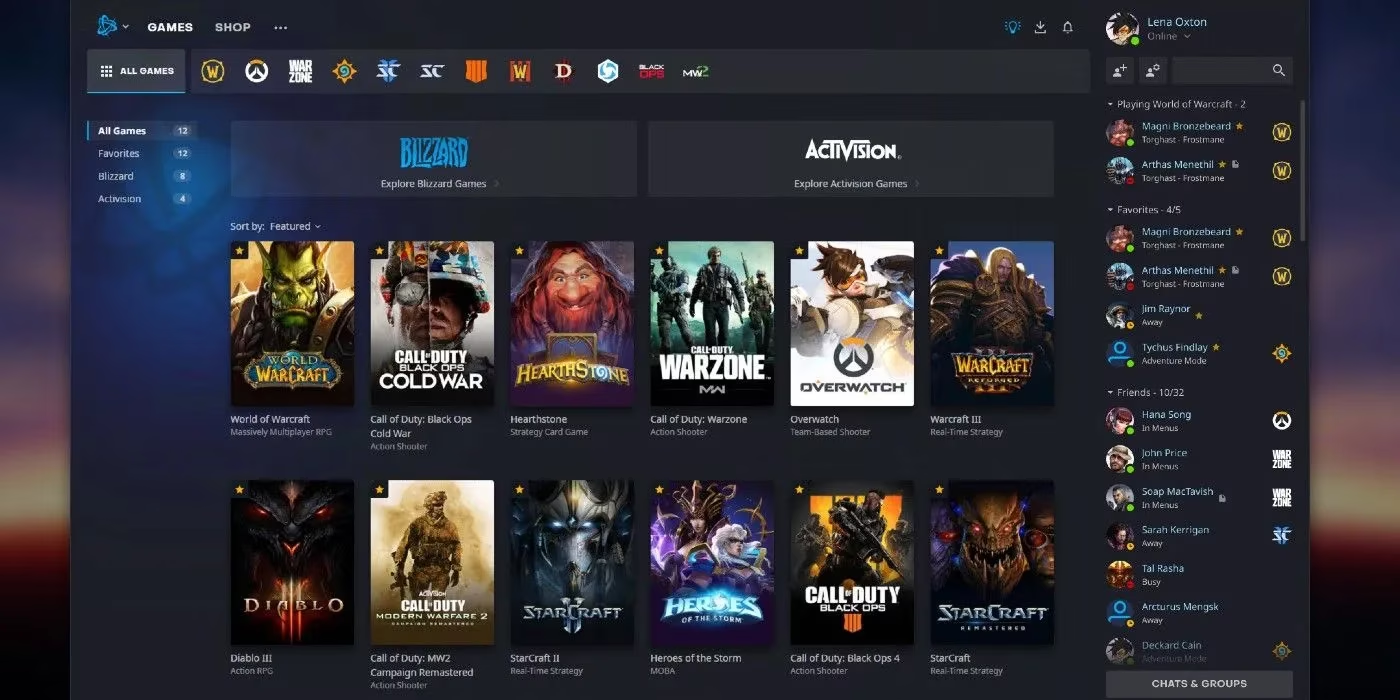
The overhaul touched the parts of Battle.net that players like me use every day. I could favorite games and arrange them for easier access. A more expansive layout for games and news appeared in full-page view. A revamped social pane let me see what friends were doing on each game tab. A new notifications hub consolidated messages and download statuses. None of these features sounds dramatic in isolation, but together they changed the rhythm of using the app. The old Battle.net sometimes felt like a cramped quest hub where every vendor stood in the same doorway; the update turned it into a map with signposts, lanes, and a place to check the party board.
| Area | Change I Care About | My Player Take |
|---|---|---|
| Accessibility | Keyboard navigation, stronger screen reader support, better color contrast | More players can move through the launcher without fighting the interface |
| Library | Favorites and custom arrangement | My most-played Blizzard games stop getting buried |
| Layout | Full-page views for games and news | I can scan updates without feeling packed into a sidebar |
| Social | Revamped friend activity by game tab | I know who is in Azeroth, who is queuing in Overwatch, and who is grinding Call of Duty |
| Notifications | Consolidated messages and download statuses | I stop hunting for patch progress in three different corners |
🎮 The social pane deserves special mention because it turned the launcher into a quieter version of a guild hall. I do not need a loud dashboard; I need to know whether a friend is already in a game before I invite them. A notification hub works in a similar way. It is like a lighthouse keeper’s logbook: it does not calm the sea, but it tells me which ships are coming in and which downloads are still drifting toward shore. 🔔
A Staged Rollout and a Feedback Loop
I also remember that the update did not appear everywhere at once. Some users had already seen the new features during beta, while everyone else met them when the new version went live. To ensure stability, the patch went out to certain areas of North America first before reaching other regions. In 2026, staged rollouts are familiar, but the principle still matters: a launcher is infrastructure, and infrastructure should not collapse just because the interface looks fresher. Blizzard also invited feedback on the update, which I see as a healthy sign. A client that connects millions of players should be treated as a living service, not a monument.
The timing of the overhaul also connected to a wider Blizzard effort. Around that period, the company had been experimenting with machine-learning technology to reduce toxicity in Overwatch chat. I do not treat those efforts as identical, but I do see a shared direction: Blizzard was trying to improve the online layer around its games, not just the games themselves. As a player, that matters. I spend a lot of time in launchers, chat windows, and patch queues, and the quality of that space shapes my patience before I ever enter a match.
Why It Still Matters in 2026
Today, I expect Battle.net to be accessible, readable, and socially useful. That expectation did not appear by accident. The 2021 update made the launcher easier to navigate and more welcoming to players with different needs, and those priorities have become part of how I judge every game client. When a download stalls, when a friend list hides activity, or when a menu refuses to cooperate with a keyboard, I notice. The best changes are the ones that become invisible because they simply work. For me, Battle.net’s overhaul was a well-received step in that direction, and its core ideas remain relevant in 2026: make the client easier to use, make the community easier to read, and make access less of a maze.
Comments